As a small business owner, I always found the struggle to get followers to my Linkedin Company page.
Quick recap: Linkedin is the leading B2B Social network in the world. We already found and described a great plan to increase the number of followers on your profile. Linkedin Following is key for your professional life, it will bring business connections. Those connections can become suppliers but they can also become clients.
February 21, 2020 Update
Linkedin now is currently offering users to invite 25 of their personal contacts every day as Invite Connections under the Reach subsection of the Admin Tools of your company page.
Inbound or Outbound
There are two ways of getting clients on Linkedin: Inbound or Outbound.
Inbound: You will publish content on your profile and hope that your connections that will view the post will engage and interact with it. Like all inbound marketing, it’s non invasive.
Outbound: I have quite a few Linkedin Connections – 5554 at the time I’m writing this article. And it’s constantly growing as I use the plan mentioned above. Meaning I receive “intro messages” in my inbox of people trying to sell me services, scheduling a call, and more on a daily basis.
Current Solutions for your Linkedin Company Page
Ok, so we recapped the personal connections and messages on Linkedin. Now, the company pages… That is another story. Even though I have 5500+ followers on Linkedin, gathering company followers for The X Concept always has been a little bit more of a struggle because the ways to promote your page until now was:
- Engage your employees
- Promote the page outside the company
- Add a “Follow” button to your website
- Take part in LinkedIn Groups
- Post Careers
- Launch a Follow Ad campaign
Ok, When you don’t have full time employees, it’s harder to engage them. Promote the page outside the company, like on blog posts, newsletters, the CTR is relatively low… so not much result there either.
Adding a follow button to my website… Not really, it’s not the prettiest thing there is. Take part in Linkedin Groups to highlight your company is quite tedious. By posting careers, you will receive applicants that will follow your company page, because the hiring manager will be notified if this is the case. And yes, it looks better if you do. But for this you need to be hiring. Launch a follow ad campaign, that’s true, this is something beneficial, and part of Paid Social marketing. But at the end of the day costs money.
What do all those solutions have in common?
All those solutions have one thing in common, they do not let you capitalize and optimize on a network you already created with your personal profile. Let’s talk numbers, I didn’t follow any of the solutions listed above to try to grow my following, but was posting all blog content from this website on my personal profile as well as on my company profile, and this got me to a whooping 14 followers. Yeah, tell me about it…
Something happened very recently with your Linkedin Company Page
There is a new feature that just happened last week (at the time this article was written). You can now INVITE your connections to follow your page. Yes, just like on Facebook you can invite your “friends” to “like” your page. Is Linkedin becoming more millennial friendly? Or is it just a way for them to open up features to help smaller businesses with organic growth? Let’s put it this way, their motivation does not matter, What matters is how you can use it. So let’s look how you can do it.
First of all, Log onto linkedin, and open your Linkedin Company Page on your laptop (or desktop) you will find that under the “ME” section in the navigation bar on top of the Linkedin profile. There will be a sub menu, and you might need to scroll a little until you find your company page. Click on it. You will then land in Admin Mode, that’s where you want to be.

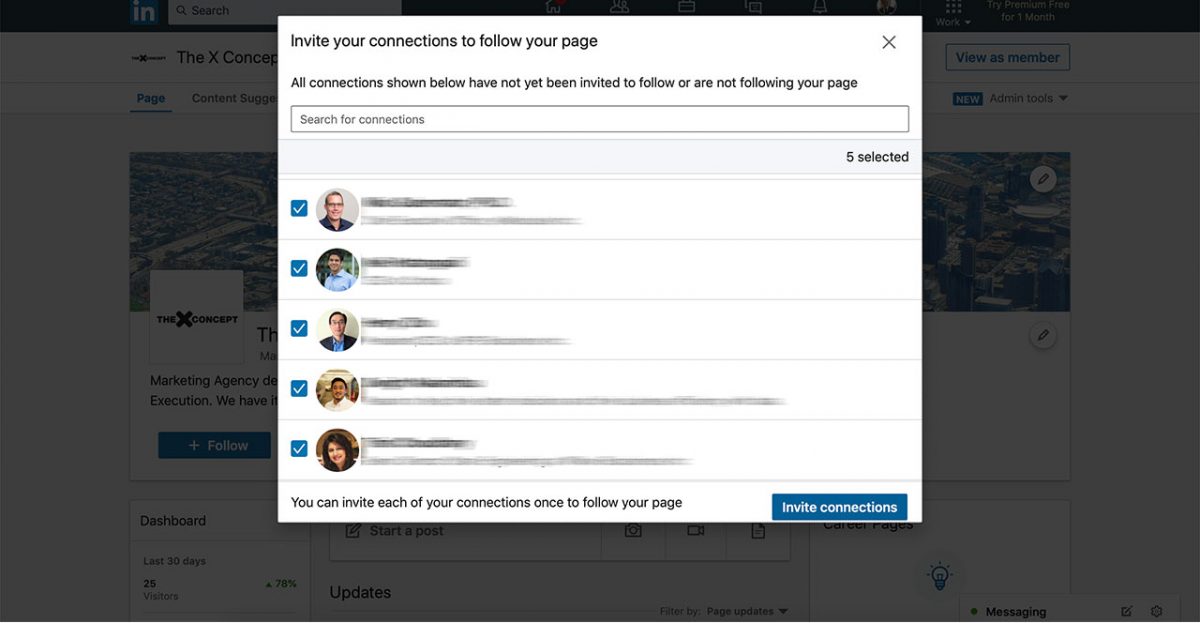
Now you will look under Admin Tools where you will find under the “Extend Your Reach” submenu the “Invite Connections” link… Click on it, therefore a popup window will appear.

Below you will see how the popup looks like. It will allow you to either search your connections and invite certain people, industry specific or more. Or you can browse through your connections.

After finding your connections, you will be able to invite your connections. As you can see on the bottom left of the window, you can only invite your connections ONCE to your page, meaning the content of your page might be dialed in before you place your invites.

After Clicking on the blue bottom at the bottom right of the page, you can wait until your connections click your page and accept the invite.
Tracking Data
I will be tracking the data on how many people clicked on the invite and liked my Company Page. Providing you with exact number.
June 2019 – Update
After running some tests with Lorenzo and Jan who contacted me in the comments telling me that they couldn’t see the option on their profile. We are still trying to determine what factor a part from being “random” there is in common. I thought it was related to the amount of followers they had on their personal profile (less than 1000). But one of Lorenzo’s colleague with 94 followers had access to the feature. So we know it’s not the amount of followers. We tried with other profiles located in Europe, as they are both from Europe – and had access to the feature with a France based profile with (15000 connections) so we know that’s not it. If someone has an answer on why they don’t have access to the feature, please add it to the comments.